
Best overall for pre-build idea critique: Pivotproof. Best for search-interest research: Google Trends. Best for simple questionnaires: Google Forms. These seven startup idea validation tools cover different decisions in 2026, from challenging your concept to observing how prospective customers respond.
- Pivotproof is best for founders using startup idea validation tools to critique a concept before building.
- Google Trends checks search interest; Google Forms collects answers directly from prospective customers.
- Figma tests product interactions; Unbounce supports landing-page experiments; Hotjar shows website behavior.
- Calendly supports customer interview scheduling. None of these tools alone proves that customers will buy.
Why this matters
An idea score, a survey response, and a completed signup answer different questions. Treating them as interchangeable creates false confidence: someone liking your concept does not establish that they will change behavior to use it.
For your 2026 validation plan, choose the tool that addresses your next uncertainty. If the problem is unclear, talk to prospective customers. If the interaction is unclear, test a prototype. If the message is unclear, test a landing page.
The best validation stack connects a critique to observable customer behavior. Do not buy another tool until you can name the assumption it will test and the decision its results will change.
What makes the best startup idea validation tools
These criteria matter more than the length of a feature list:
- Question fit: The tool addresses a specific uncertainty about the problem, audience, message, or product.
- Evidence quality: You can distinguish stated preferences from observed actions and actual commitments.
- Setup effort: You can run the experiment without first building the product you are trying to validate.
- Audience access: You understand how to reach relevant participants; a research tool does not automatically supply them.
- Decision clarity: The result supports a concrete choice: revise the concept, investigate further, or stop.
Use these criteria when comparing startup idea validation tools in 2026. A sophisticated interface is not a substitute for an appropriate experiment.
Startup idea validation tools at a glance
The order below follows the validation workflow, starting with concept critique. It is not a claim that one tool produces better evidence for every question.
| Tool | Best for | Standout function | Key limitation |
|---|---|---|---|
| Pivotproof | Pre-build idea critique | Five AI expert personas critique and score ideas | Critique is not direct customer evidence |
| Google Trends | Search-interest research | Compares relative search interest | Does not establish purchase intent |
| Google Forms | Simple customer questionnaires | Collects structured responses | Respondents describe rather than demonstrate behavior |
| Figma | Prototype usability | Interactive product prototypes | Prototype use is not product adoption |
| Unbounce | Landing-page message tests | Builds landing pages for experiments | Requires relevant visitor traffic |
| Hotjar | Website behavior analysis | Heatmaps and session recordings | Behavior alone does not explain motivation |
| Calendly | Customer interview scheduling | Booking links for meetings | Scheduling is not participant recruitment |
1. Pivotproof: best for pre-build idea critique
Pivotproof is a paid online tool that uses five AI expert personas to critique and score startup ideas. It serves founders and entrepreneurs who want to examine a concept before building it.
Use the critique to identify assumptions that need outside evidence. A score is an assessment of the idea, not a record of customer purchases or usage.
Pivotproof pros:
- Focuses specifically on startup concepts.
- Provides critique through five expert personas.
- Adds scoring to the feedback.
Pivotproof cons:
- Persona feedback is not a customer interview.
- Scoring does not establish willingness to pay.
Best for: Founders who need a structured challenge to an early concept.
Verdict: Buy for concept critique; pair the findings with customer research.
2. Google Trends: best for search-interest research
Google Trends shows relative interest in search terms across time and geography. Use it to investigate the language people search for and compare related problem categories.
Start with the customer's problem, not only your proposed product name. A new category name can have little search history even when the underlying problem exists.
Google Trends pros:
- Compares related search terms.
- Shows changes in interest over time.
- Supports geographic comparisons.
Google Trends cons:
- Relative interest is not an absolute customer count.
- Searches do not demonstrate willingness to buy.
Best for: Founders investigating whether a problem has recognizable search demand.
Verdict: Hold product decisions until search patterns are supported by direct customer evidence.
3. Google Forms: best for simple customer questionnaires
Google Forms collects answers through shareable forms. Use it to organize responses about current workflows, recurring problems, and existing alternatives.
Ask what respondents already do, not whether they like your idea. Describe the audience you surveyed alongside the results; answers from friends do not represent an unrelated buyer segment.
Google Forms pros:
- Supports structured questionnaires.
- Collects responses in a consistent format.
- Connects responses with Google Sheets for analysis.
Google Forms cons:
- You must find relevant respondents.
- Self-reported preferences are not observed behavior.
Best for: Founders gathering comparable answers about a defined customer problem.
Verdict: Hold feature decisions until you investigate the behavior behind the answers.
4. Figma: best for prototype usability
Figma supports interface design and interactive prototypes. Use a prototype to see whether a prospective user understands a proposed workflow before you implement it.
Give participants a task rather than a guided tour. Watch where they hesitate, misunderstand labels, or choose an unexpected path; explaining the interface during the task hides those problems.
Figma pros:
- Makes proposed interactions tangible.
- Supports testing before product implementation.
- Helps expose confusing workflows.
Figma cons:
- A prototype does not demonstrate production reliability.
- Completing a task does not prove ongoing demand.
Best for: Founders testing how a proposed product interaction works.
Verdict: Hold development until users can complete the core task without coaching.
5. Unbounce: best for landing-page message tests
Unbounce provides landing-page building and testing capabilities. Use it to present a problem, proposed solution, and clear next action to a relevant audience.
Give the page 1 primary action, such as requesting a conversation. State what happens after submission, and do not imply that an unfinished product is ready to use.
Unbounce pros:
- Supports dedicated landing pages.
- Separates messaging experiments from product development.
- Enables comparison of page variations.
Unbounce cons:
- You still need a relevant traffic source.
- A signup is not a purchase or sustained usage.
Best for: Founders testing whether a message prompts a defined action.
Verdict: Buy when you have an audience and a specific messaging hypothesis.
6. Hotjar: best for website behavior analysis
Hotjar provides heatmaps and session recordings for understanding website interactions. Use it to inspect how visitors move through an existing validation page.
Look for behavior that warrants investigation, such as repeated attempts to use a noninteractive element. Then ask users what they expected; a recording shows the action, not the explanation.
Hotjar pros:
- Shows interactions beyond aggregate page totals.
- Helps locate friction on an existing page.
- Supports more specific follow-up questions.
Hotjar cons:
- Requires visitors and an instrumented website.
- Recordings do not establish why someone acted.
Best for: Founders investigating friction on a live validation page.
Verdict: Buy after you have traffic and a behavior question to investigate.
7. Calendly: best for customer interview scheduling
Calendly lets people book meetings through scheduling links. It supports validation logistics, rather than evaluating startup ideas itself.
Use the meeting for a 3-question interview: What happened the last time you faced this problem? What did you do? What was unsatisfactory about that approach? Follow the answers instead of turning the conversation into a product pitch.
Calendly pros:
- Provides a clear booking action.
- Reduces scheduling back-and-forth.
- Supports arranging customer conversations.
Calendly cons:
- Does not recruit your target audience.
- Cannot fix leading interview questions.
Best for: Founders arranging interviews with already-identified prospects.
Verdict: Buy for scheduling support; skip it as a substitute for research.
How the tools rank
This 2026 ranking prioritizes question fit, evidence quality, setup effort, audience access, and decision clarity. Concept critique comes first because it helps define the next investigation, not because scoring outranks customer behavior.
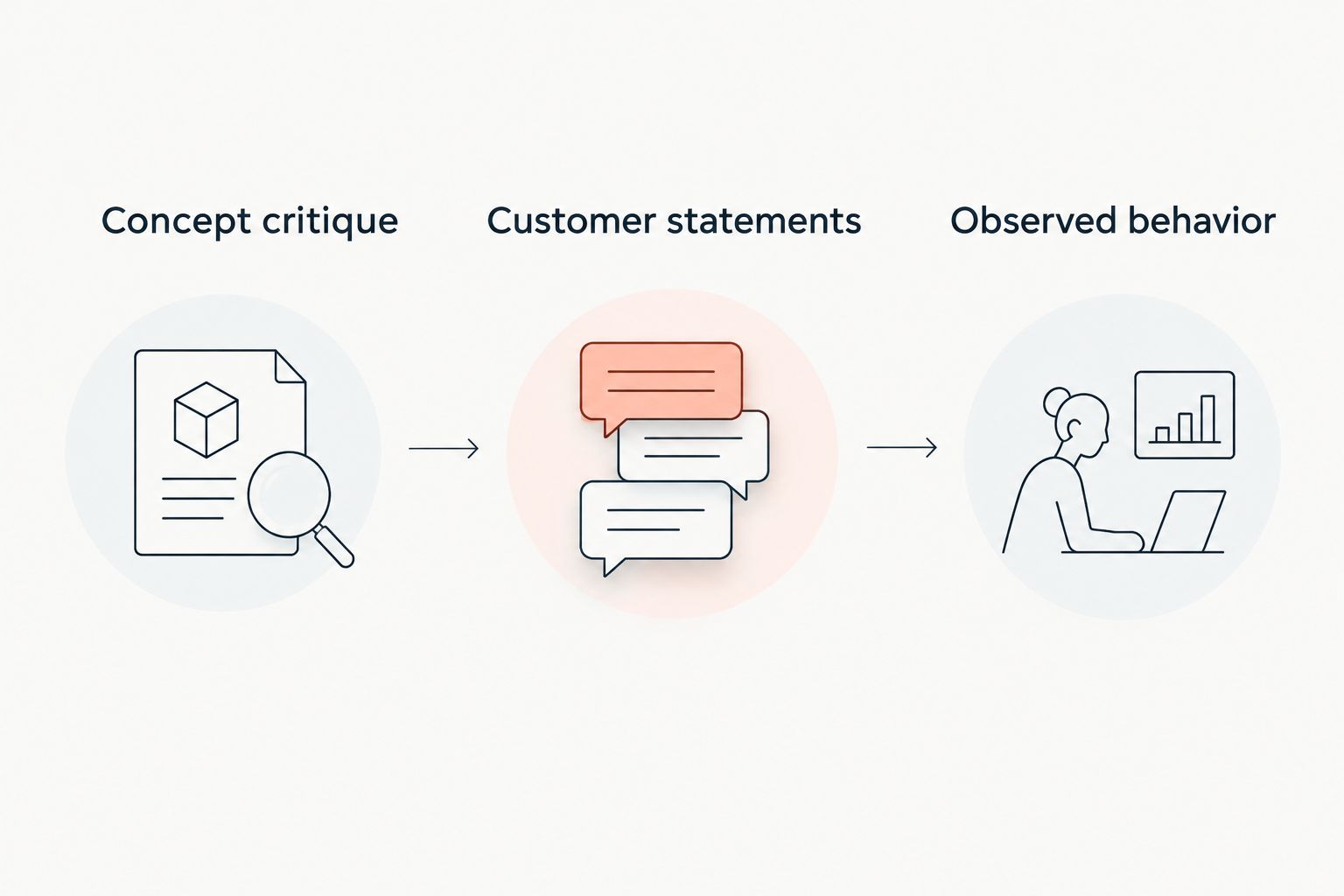
Keep three evidence types separate:
- Concept critique: Challenges the logic of the proposed business.
- Customer statements: Explain problems and existing workarounds.
- Observed behavior: Shows what people actually do during an experiment.
Each adds context. None should be relabeled as proof of a different kind.
Which startup idea validation tools should you choose?
Start with the unresolved question, not the longest feature list. For an unexamined concept, choose structured critique. For an unclear customer problem, use interviews and questionnaires. For an unclear interaction, choose a prototype.
In 2026, a useful starting combination is concept critique followed by customer conversations. Add landing-page or behavior tools only when you have a specific experiment and an audience to reach.
FAQ
What's the best startup idea validation tool for an early concept?
Pivotproof is best for structured pre-build concept critique. Its five AI expert personas critique and score startup ideas; customer research must establish whether the underlying assumptions hold.
Can Google Trends prove demand for my startup?
No, Google Trends cannot prove purchase demand. It shows relative search interest, which helps investigate language and attention rather than buying behavior.
Should I use a survey or customer interviews first?
Use interviews first when you do not yet understand the problem or customer language. Use a questionnaire when you have specific questions that need comparable answers.
Is a Figma prototype enough to validate an idea?
No, a Figma prototype tests proposed interactions, not the entire business. Combine usability observations with evidence about the customer's problem and commitment.
What's the difference between Unbounce and Hotjar?
Unbounce supports landing-page creation and experiments; Hotjar helps inspect behavior on a website. Choose based on whether you need to build the test page or understand interactions on it.
How many startup idea validation tools do I need?
Use only the tools needed to answer your current question. Adding tools without a decision rule creates more information without resolving the uncertainty.
One last thing
Before running your next 2026 experiment, write down what result would make you stop or change direction. If every possible outcome counts as encouragement, you are collecting reassurance rather than validating a startup idea.